Running a home service business today is more demanding than ever.
Customers expect fast replies. Missed calls turn into lost jobs. Scheduling mistakes create frustration. Follow-ups fall through the cracks. Reviews are forgotten. Meanwhile, competitors using automation systems are responding faster, staying organized, and winning more customers without adding more office staff.
For many contractors and local service businesses, the problem is not a lack of skill or work ethic. The real problem is that manual systems cannot keep up with modern customer expectations anymore.
That is where automation changes everything.
Business automation helps home service companies streamline repetitive tasks like lead capture, scheduling, customer communication, follow-ups, invoicing, and review requests. The goal is not to replace people. The goal is to reduce wasted time, improve customer experience, and help businesses operate more efficiently.
Whether you run an HVAC company, plumbing business, electrical service, roofing company, landscaping business, cleaning company, or another local service operation, automation can help you:
- respond to leads faster,
- reduce missed opportunities,
- improve organization,
- generate more reviews,
- and save hours of manual work every week.
This guide explains exactly how automation works for home service businesses, the best systems to implement, the tools worth considering, and how to start building practical workflows that support long-term growth.
What Is Automation for Home Service Businesses?
Automation for home service businesses refers to using software, AI tools, and connected workflows to handle repetitive business tasks automatically.
Instead of manually responding to every inquiry, scheduling appointments one by one, sending reminders individually, or tracking customers on paper, automation systems help streamline those processes.
Common examples include:
- missed-call text-back systems,
- online booking tools,
- automated reminders,
- CRM workflows,
- AI chatbots,
- review request systems,
- and automated follow-up messages.
The purpose of automation is not to make a business feel robotic. The purpose is to improve speed, consistency, organization, and customer communication while reducing repetitive administrative work.
For local service businesses, automation often becomes the difference between:
- losing leads versus capturing them,
- appearing professional versus disorganized,
- and scaling operations versus constantly feeling overwhelmed.
Why More Home Service Businesses Are Automating in 2026
Customer expectations have changed dramatically.
Years ago, customers were willing to wait hours or even days for callbacks. Today, many people move on to the next business within minutes if they do not receive a response quickly.
At the same time, home service businesses face growing pressure from:
- rising operational costs,
- labor shortages,
- increased competition,
- and review-driven local SEO.
Modern customers expect:
- quick communication,
- online scheduling,
- text reminders,
- fast estimates,
- and easy payment options.
Businesses still relying entirely on manual systems often struggle to keep up.
Automation helps bridge that gap by improving operational efficiency without requiring a large office team.
For example:
- An automated text-back system can immediately respond to missed calls.
- Scheduling software can reduce back-and-forth communication.
- Review automation can consistently generate customer feedback.
- AI chat systems can answer basic questions after hours.
- CRM workflows can organize leads automatically.
These systems help businesses respond faster while improving the overall customer experience.
The Most Common Operational Problems Contractors Face
Many home service businesses repeatedly experience the same operational bottlenecks.
The issue is usually not a lack of customers. The issue is what happens after customers try to contact the business.
Missed Calls
A missed call often means a missed job.
Many contractors spend most of the day in the field, driving, managing crews, or working on-site. If nobody answers the phone, potential customers may immediately contact another company.
Missed-call text-back systems help automatically recover those opportunities.
Slow Lead Response Times
Speed matters.
The first business to respond often has the highest chance of winning the customer. Manual lead handling creates delays that reduce conversion opportunities.
Automation helps businesses respond within seconds instead of hours.
Manual Scheduling Problems
Phone-tag scheduling wastes time for both businesses and customers.
Without scheduling systems:
- appointments overlap,
- reminders are forgotten,
- and no-shows increase.
Online booking systems reduce scheduling friction dramatically.
Forgotten Follow-Ups
Many businesses lose leads simply because follow-up never happens.
Customers requesting estimates may never hear back again after the initial conversation.
Automated follow-up systems help keep leads engaged.
Weak Review Collection
Most satisfied customers never leave reviews unless they are asked.
Without automation:
- review requests are inconsistent,
- opportunities are missed,
- and local SEO suffers.
Disorganized Customer Information
Customer notes scattered across:
- notebooks,
- spreadsheets,
- text messages,
- or sticky notes
create operational chaos over time.
CRM systems centralize customer information and improve the organization.
What Automation Really Means for Local Service Businesses
Some business owners hear the word “automation” and assume it means removing personal customer service.
In reality, good automation improves customer experience.
Automation does not replace relationships. It removes repetitive tasks that slow businesses down.
For example:
- Customers appreciate fast confirmations.
- Reminder texts reduce confusion.
- Faster follow-up creates trust.
- Organized systems make businesses appear more professional.
Automation allows business owners and staff to spend more time on high-value work instead of repetitive administrative tasks.
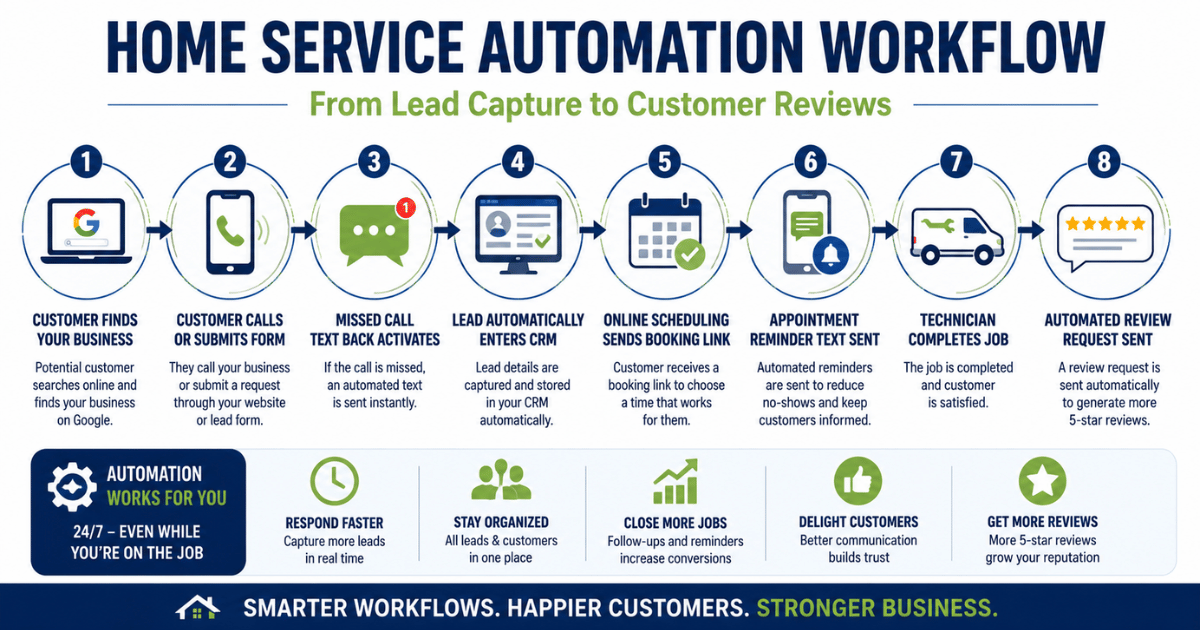
Example: HVAC Automation Workflow
Here is what a simple HVAC automation workflow may look like:
Step 1 — Customer Finds Business
A homeowner searches Google for HVAC repair services.
Step 2 — Customer Calls
The business misses the call because technicians are busy.
Step 3 — Automated Text Responses
A missed-call text-back system instantly replies:
“Thanks for contacting us. How can we help you today?”
Step 4 — Lead Enters CRM
The customer’s information is automatically stored.
Step 5 — Appointment Scheduling
The customer receives a booking link.
Step 6 — Reminder Automation
Text reminders are sent before the appointment.
Step 7 — Service Completed
The technician finishes the work.
Step 8 — Review Request Sent
The customer automatically receives a review request.
Instead of manually managing every step, automation keeps the workflow moving consistently.
Types of Automation Every Home Service Business Should Use
Not every business needs complicated systems.
Most local service companies can see major improvements by focusing on a few core automation categories.
Lead Capture Automation
Lead capture automation helps businesses respond quickly when customers make contact.
Examples include:
- website forms,
- AI chatbots,
- call tracking,
- CRM intake systems,
- and missed-call text-back automation.
The goal is to prevent leads from falling through the cracks.
Scheduling Automation
Scheduling automation reduces manual coordination.
Common features include:
- online booking,
- calendar syncing,
- appointment confirmations,
- and reminder texts.
This improves customer convenience while reducing no-shows.
Customer Communication Automation
Communication systems help businesses stay responsive.
Examples include:
- SMS confirmations,
- automated updates,
- AI chat responses,
- and service reminders.
Customers often judge professionalism based on communication quality.
Follow-Up Automation
Many businesses lose opportunities after the first conversation.
Follow-up automation helps:
- re-engage leads,
- remind customers about estimates,
- and nurture repeat business.
Simple follow-up systems can significantly improve conversion rates over time.
Review & Reputation Automation
Online reviews heavily influence local purchasing decisions.
Automation helps businesses:
- consistently request reviews,
- send feedback reminders,
- and improve online reputation management.
This also strengthens local SEO visibility.
Payment & Invoice Automation
Invoice automation improves cash flow and reduces administrative work.
Features may include:
- digital invoices,
- payment reminders,
- online payment links,
- and recurring billing.
Marketing Automation
Marketing automation helps businesses stay visible without constant manual effort.
Examples:
- seasonal reminders,
- maintenance campaigns,
- email newsletters,
- and reactivation campaigns.
This is especially useful for repeat-service industries.
Best Automation Tools for Home Service Businesses
The best tool depends on:
- business size,
- budget,
- workflow complexity,
- and operational needs.
Instead of chasing the newest AI trend, businesses should focus on tools that solve real workflow problems.
CRM Software
CRM systems help organize:
- leads,
- customer records,
- estimates,
- job history,
- and communication.
Good CRM systems improve visibility across the business.
Ideal for:
- HVAC companies,
- plumbers,
- electricians,
- roofing businesses,
- and growing service teams.
Scheduling Platforms
Scheduling tools reduce manual appointment coordination.
Helpful features:
- online booking,
- route management,
- automated reminders,
- and technician scheduling.
These systems improve operational efficiency and customer convenience.
AI Chatbots
AI chat systems can:
- answer common questions,
- collect lead information,
- and provide after-hours communication.
They work best when paired with human follow-up rather than replacing customer service entirely.
Review Automation Software
Review platforms automate review requests through:
- SMS,
- email,
- or follow-up campaigns.
Consistent review generation supports:
- local SEO,
- trust,
- and customer credibility.
Workflow Automation Platforms
Workflow tools connect multiple systems.
For example:
- lead forms → CRM,
- CRM → reminders,
- reminders → review requests.
This reduces manual data handling and improves consistency.
Industry-Specific Automation Examples
Different industries benefit from automation in different ways.
HVAC Automation
HVAC businesses often deal with:
- emergency calls,
- seasonal demand spikes,
- and repeat maintenance schedules.
Helpful automations:
- maintenance reminders,
- seasonal campaigns,
- technician dispatch workflows,
- and estimate follow-ups.
Plumbing Automation
Plumbing businesses benefit from:
- rapid lead response,
- emergency scheduling,
- and after-hours communication systems.
Missed-call text-back systems are especially valuable here.
Electrical Contractor Automation
Electrical businesses often manage:
- commercial scheduling,
- recurring service work,
- and estimate coordination.
CRM organization and workflow tracking become extremely important as operations grow.
Cleaning Business Automation
Cleaning companies benefit heavily from:
- recurring scheduling,
- automated reminders,
- online booking,
- and recurring billing systems.
These businesses often scale efficiently through streamlined workflows.
Roofing Automation
Roofing businesses typically rely heavily on:
- lead follow-up,
- estimate tracking,
- and review generation.
Automation helps reduce lost opportunities during long sales cycles.
Landscaping Automation
Landscaping companies often manage:
- recurring customers,
- route scheduling,
- and seasonal promotions.
Automation simplifies recurring communication and scheduling management.
How Automation Helps Win More Customers
Customers usually contact multiple businesses before making a decision.
Fast communication often creates a competitive advantage.
Businesses using automation generally appear:
- more responsive,
- more organized,
- and more professional.
This improves customer confidence.
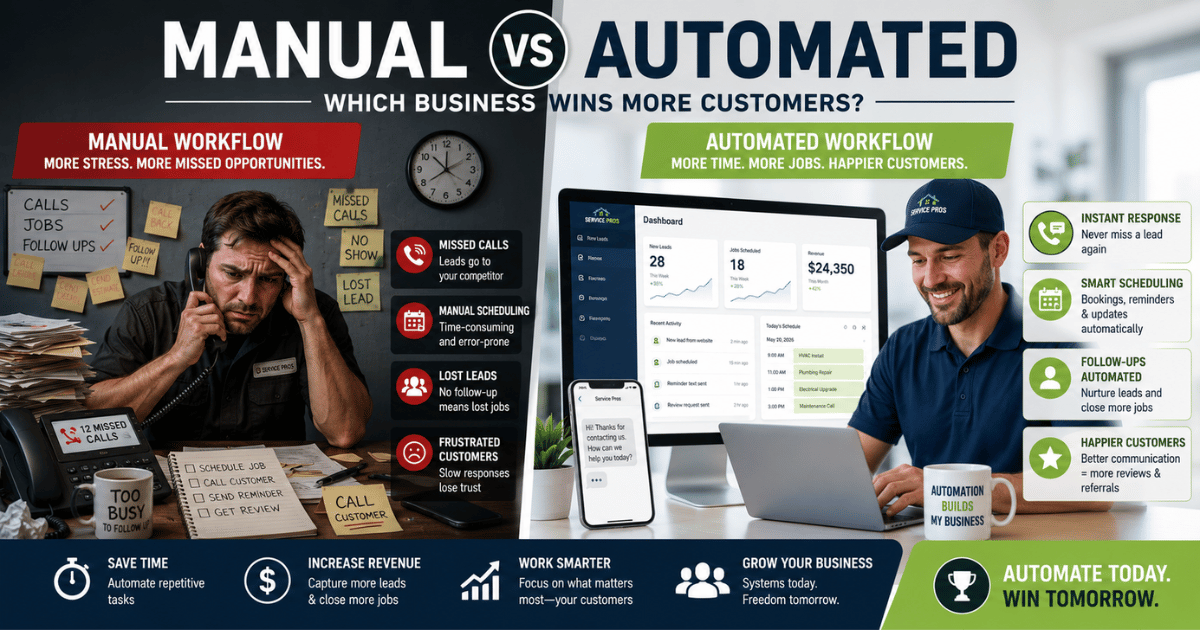
Manual vs Automated Experience
| Manual Business | Automated Business |
|---|---|
| Delayed callbacks | Instant responses |
| Paper scheduling | Online booking |
| Forgotten follow-ups | Automated reminders |
| Inconsistent reviews | Consistent review requests |
| Scattered customer notes | Organized CRM |
| Manual invoicing | Automated payments |
Even simple automation improvements can significantly improve customer experience.
Common Automation Mistakes to Avoid
Automation works best when implemented strategically.
Many businesses make the mistake of overcomplicating systems too early.
Using Too Many Tools
Too many disconnected platforms create confusion.
Businesses should focus on building simple workflows first.
Automating Broken Processes
Automation does not fix poor systems automatically.
Businesses should improve workflows before automating them.
Ignoring Customer Experience
Poorly designed automation can feel impersonal.
Businesses should balance automation with genuine human communication.
Lack of Staff Training
Even great software becomes ineffective if teams do not understand how to use it properly.
Chasing Trends Instead of Solving Problems
Not every business needs advanced AI systems immediately.
Start with:
- communication,
- scheduling,
- follow-up,
- and organization.
Solve operational problems first.
Step-by-Step Starter Automation Plan
Businesses do not need to automate everything at once.
A phased approach works best.
Step 1 — Identify Operational Bottlenecks
Look for repetitive tasks consuming unnecessary time.
Examples:
- answering repetitive questions,
- scheduling manually,
- chasing reviews,
- or forgetting follow-ups.
Step 2 — Automate Lead Capture
Implement:
- web forms,
- CRM intake,
- or missed-call text-back systems.
Fast response creates immediate improvement.
Step 3 — Add Scheduling Automation
Allow customers to:
- request appointments,
- receive confirmations,
- and get reminders automatically.
Step 4 — Build Follow-Up Workflows
Automate:
- estimate reminders,
- appointment confirmations,
- and post-service communication.
Step 5 — Implement Review Requests
Create a simple review-request process after completed jobs.
Consistency matters more than complexity.
Step 6 — Track Results
Measure:
- response times,
- booking rates,
- review growth,
- and lead conversion improvements.
Automation should support measurable operational improvements.
ROI of Automation for Home Service Businesses
The return on automation often comes from:
- saved time,
- improved organization,
- better customer retention,
- and increased lead conversion.
For example:
- A faster response may improve booking opportunities.
- Automated reminders may reduce no-shows.
- Better reviews may improve local search visibility.
- Organized workflows may reduce administrative stress.
The biggest benefit is usually operational consistency.
Businesses no longer rely entirely on memory, sticky notes, or manual processes.
The Future of AI & Automation for Local Businesses
Automation will continue evolving rapidly over the next several years.
Future systems may include:
- AI voice assistants,
- predictive scheduling,
- smarter customer communication,
- advanced workflow automation,
- and deeper CRM integrations.
However, the core principle will remain the same:
Businesses that respond faster, communicate clearly, and operate efficiently will continue gaining competitive advantages.
Automation is becoming less of a luxury and more of an operational necessity for many local businesses.
Frequently Asked Questions
What is automation for home service businesses?
Automation helps businesses streamline repetitive tasks like scheduling, customer communication, follow-ups, invoicing, and review requests using software and connected workflows.
What are the best automation tools for contractors?
The best tools depend on business needs, but common categories include:
- CRM software,
- scheduling systems,
- AI chatbots,
- review automation,
- and workflow automation platforms.
Can small service businesses use automation?
Yes. Small businesses often benefit significantly because automation helps reduce administrative workload while improving responsiveness.
Is automation expensive?
Costs vary widely. Many businesses start with affordable tools focused on scheduling, communication, or lead management before expanding into larger systems.
What is CRM automation?
CRM automation organizes customer information and automates tasks like follow-ups, reminders, lead tracking, and communication workflows.
How does scheduling automation work?
Scheduling software allows customers to request or book appointments online while automatically sending confirmations and reminders.
Can automation help get more reviews?
Yes. Automated review requests help businesses consistently ask satisfied customers for feedback after completed jobs.
What is missed-call text-back?
Missed-call text-back systems automatically send text messages when businesses miss incoming calls, helping recover potential leads quickly.
How do contractors automate customer follow-up?
Contractors often use CRM workflows, email automation, SMS reminders, and scheduling systems to automate follow-up communication.
What automation should businesses start with first?
Most businesses should start with:
- lead capture,
- scheduling,
- customer communication,
- and review automation.
These areas usually create the fastest operational improvements.
Final Thoughts
Start Building a Smarter Home Service Business
The businesses winning more customers today are not always the biggest companies. Often, they are the businesses with faster response times, better organization, and smoother customer communication.
Home service business automation helps reduce missed opportunities, simplify daily operations, and create a better experience for both customers and staff.
You do not need to automate everything overnight.
Start with the workflows that save the most time:
- lead capture,
- scheduling,
- follow-ups,
- and customer communication.
Small operational improvements can create major long-term results.
Free Resources to Help You Get Started
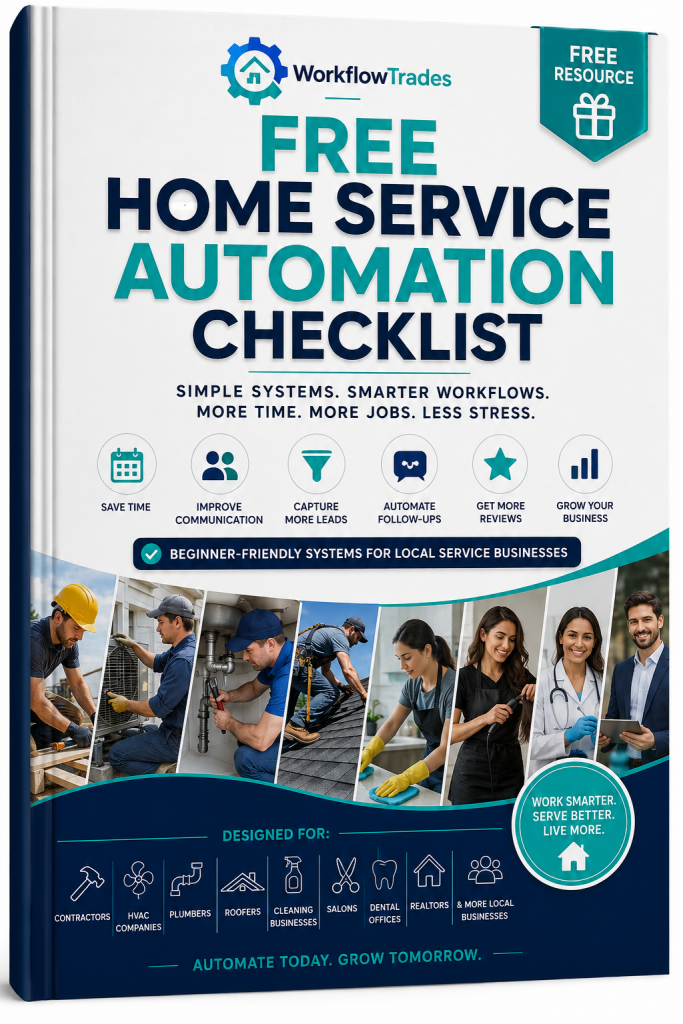
Download the Free Home Service Automation Checklist
Learn the essential workflows, tools, and systems local service businesses can implement to improve efficiency and customer communication.
Explore More Workflow Trades Guides
Related Articles
- Best AI Tools for Local Service Businesses
Learn which AI tools help contractors and local businesses automate customer communication, scheduling, and follow-ups. - How Local Businesses Lose Customers Without Automation
Discover the hidden operational problems that cause missed leads, delayed responses, and lost revenue. - CRM Automation for Contractors
Learn how CRM workflows help organize leads, automate follow-ups, and improve customer management. - Best Scheduling Software for Cleaning Businesses
Compare scheduling tools designed to streamline appointments, reminders, and recurring bookings. - HVAC Automation Guide
See how HVAC companies use automation workflows to improve service scheduling, maintenance reminders, and customer retention. - Missed Call Text Back Systems Explained
Understand how automated text-back systems help businesses recover missed leads instantly.
Build Workflows That Help Your Business Grow
The goal of automation is not to remove the human side of your business.
The goal is to remove unnecessary friction so your business can:
- respond faster,
- stay organized,
- improve customer experience,
- and operate more efficiently as it grows.
The sooner businesses build smarter workflows, the easier it becomes to compete in a market where speed and communication matter more than ever.