Many local businesses believe they lose customers because of pricing, competition, or marketing.
Sometimes that is true.
However, many businesses lose customers long before pricing even becomes part of the conversation.
They lose customers because:
- calls go unanswered,
- follow-ups never happen,
- estimates get delayed,
- scheduling becomes confusing,
- communication feels inconsistent,
- or customers simply move on to a faster competitor.
In today’s market, speed and organization matter more than ever.
Customers expect:
- quick responses,
- easy scheduling,
- reminder texts,
- professional communication,
- and smooth customer experiences.
Businesses still relying entirely on manual systems often struggle to keep up with those expectations consistently.
That is where automation becomes critical.
Automation helps local businesses streamline repetitive workflows like:
- lead capture,
- scheduling,
- follow-ups,
- reminders,
- customer communication,
- and review requests.
The goal is not to remove the human side of service businesses.
The goal is to reduce operational friction that quietly causes businesses to lose customers every day.
This guide explains the most common ways local businesses lose customers without automation, how operational bottlenecks affect revenue, and the practical workflows businesses can implement to improve customer experience and long-term growth.
What Does “Losing Customers Without Automation” Really Mean?
Most local businesses do not intentionally ignore customers.
The problem is usually operational overload.
Business owners and teams often juggle:
- incoming calls,
- scheduling,
- customer communication,
- estimates,
- invoicing,
- follow-ups,
- and day-to-day operations simultaneously.
Without systems in place, small problems begin stacking up:
- missed calls,
- delayed responses,
- forgotten follow-ups,
- inconsistent communication,
- and scheduling confusion.
Over time, those small operational problems turn into lost revenue opportunities.
Automation helps reduce those gaps by creating more consistent customer workflows.
Why Customer Expectations Have Changed
Customer expectations today are heavily influenced by convenience.
People are used to:
- instant responses,
- online booking,
- text reminders,
- and quick communication.
If a local business takes too long to respond, customers often contact another company immediately.
This is especially true in industries like:
- HVAC,
- plumbing,
- roofing,
- cleaning,
- electrical,
- dental,
- and real estate.
Customers usually choose the business that responds first and communicates clearly.
Automation helps businesses improve responsiveness without requiring large office teams.
The Biggest Ways Local Businesses Lose Customers
Many businesses lose customers through operational inefficiencies rather than poor service quality.
Missed Calls
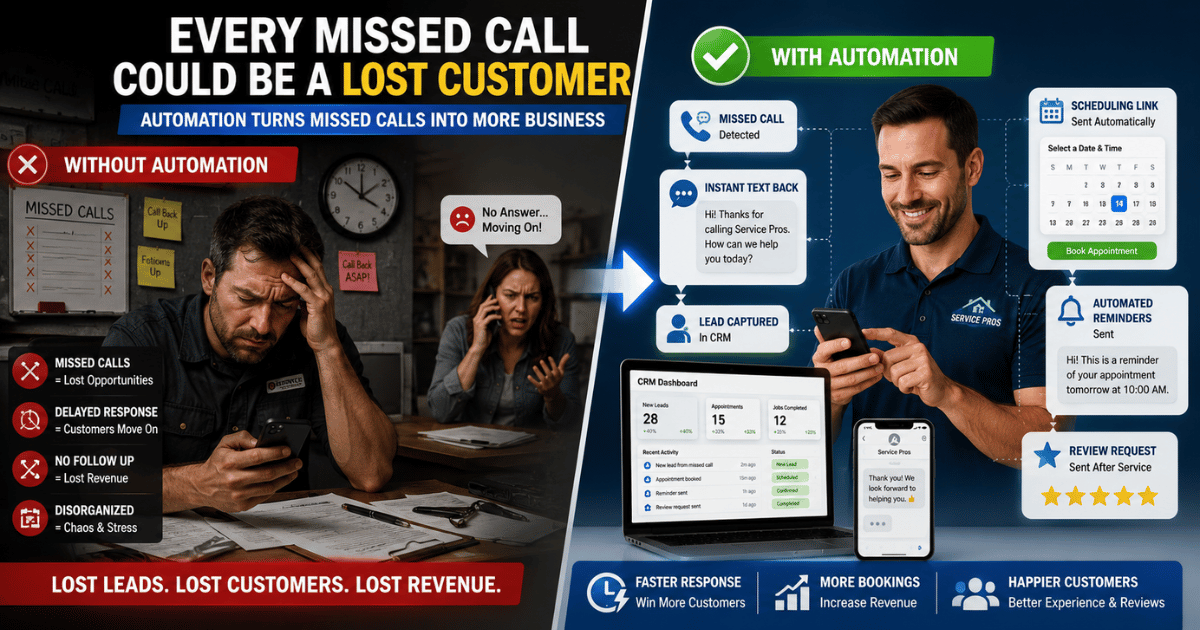
A missed call is often a lost opportunity.
Customers searching for local services usually contact multiple businesses.
If nobody answers:
- they often move on immediately,
- especially during emergencies.
Missed-call text-back systems help recover those opportunities automatically.
Slow Lead Response
Response speed matters.
Many customers choose the first business that communicates clearly and professionally.
Manual lead handling creates delays that reduce conversion opportunities.
Automation helps businesses respond within seconds instead of hours.
Forgotten Follow-Ups
Some customers need multiple touchpoints before booking a service.
Without follow-up systems:
- estimates get ignored,
- leads go cold,
- and opportunities disappear.
Automated workflows help businesses stay consistent.
Scheduling Friction
Complicated scheduling frustrates customers.
Manual scheduling often creates:
- delays,
- appointment confusion,
- double-bookings,
- and missed reminders.
Online scheduling systems simplify the process dramatically.
Poor Customer Communication
Customers become frustrated when communication feels inconsistent.
Examples include:
- unclear updates,
- delayed replies,
- forgotten reminders,
- or lack of appointment confirmations.
Automation improves consistency.
Weak Review Generation
Many businesses miss valuable review opportunities simply because they never ask customers for feedback.
Without reviews:
- trust decreases,
- local SEO weakens,
- and conversion rates often suffer.
Review automation solves this problem systematically.
Disorganized Customer Information
Customer details spread across:
- notebooks,
- text messages,
- spreadsheets,
- or paper invoices
create confusion and operational inefficiency.
CRM systems centralize customer management.
How Automation Prevents Customer Loss
Automation helps businesses create smoother operational systems.
The goal is not to remove human interaction.
The goal is to reduce delays, confusion, and repetitive tasks that negatively affect customer experience.
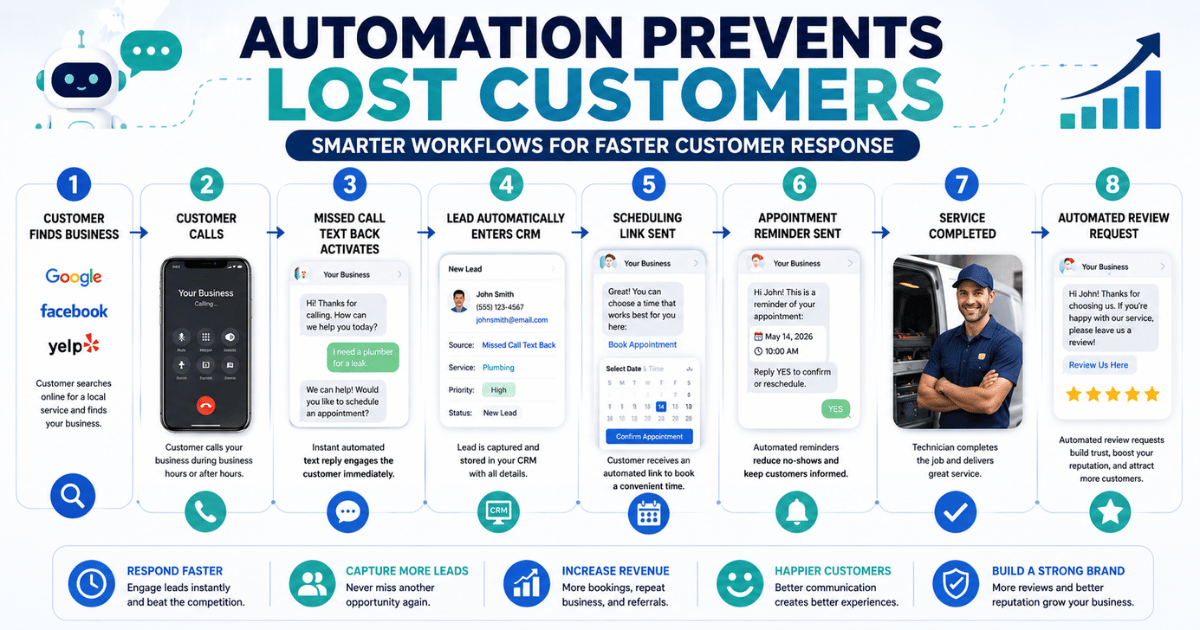
Example Workflow: Automated Lead Response
Step 1 — Customer Calls Business
A homeowner searches Google and calls a plumbing company.
Step 2 — Business Misses Call
Technicians are busy on-site.
Step 3 — Automated Text Sent
The customer instantly receives:
“Thanks for contacting us. How can we help you today?”
Step 4 — Lead Captured Automatically
The customer’s information enters the CRM.
Step 5 — Scheduling Workflow Starts
Booking options are sent automatically.
Step 6 — Reminder System Activates
The customer receives appointment reminders.
Step 7 — Review Request Sent
After the service, an automated review request is triggered.
Instead of relying on memory or manual effort, the workflow continues automatically.
Signs Your Business Is Losing Customers Without Automation
Many businesses do not realize how much operational friction affects customer retention.
Common warning signs include:
- frequent missed calls,
- delayed callbacks,
- inconsistent follow-up,
- customer complaints about communication,
- forgotten appointments,
- low review volume,
- and disorganized customer records.
If operations constantly feel reactive and chaotic, automation may help create structure.
How Different Industries Lose Customers Without Automation
Different industries experience operational bottlenecks differently.
HVAC Businesses
HVAC companies often lose leads through:
- emergency call delays,
- seasonal overload,
- and inconsistent scheduling.
Automation improves lead response and maintenance reminders.
Plumbing Companies
Plumbing customers often contact multiple businesses quickly during emergencies.
Fast response systems become critical.
Roofing Businesses
Roofing companies frequently deal with:
- long estimate cycles,
- slow follow-ups,
- and inconsistent communication.
CRM automation improves an organization significantly.
Cleaning Businesses
Cleaning companies often manage:
- recurring schedules,
- cancellations,
- and customer reminders.
Automation improves consistency and retention.
Dental Offices
Dental practices frequently lose revenue through:
- missed appointments,
- forgotten reminders,
- and inconsistent patient communication.
Automation reduces no-shows dramatically.
Realtors
Real estate professionals often lose opportunities through:
- delayed lead follow-up,
- inconsistent communication,
- and weak lead nurturing systems.
AI follow-up workflows help improve engagement.
The Real Cost of Operational Friction
Many businesses underestimate the hidden cost of inefficiency.
Operational friction often leads to:
- lost leads,
- lower retention,
- weaker online reputation,
- staff stress,
- and slower growth.
Even small workflow problems compound over time.
For example:
- One missed call may become a lost customer,
- one missed review may reduce future trust, and
- one forgotten follow-up may eliminate a high-value opportunity.
Automation helps reduce those small losses consistently.
What Automation Actually Looks Like for Local Businesses
Automation does not need to be complicated.
Most businesses benefit from simple systems such as:
- missed-call text-back,
- online scheduling,
- reminder texts,
- CRM workflows,
- automated review requests,
- and follow-up sequences.
These systems create operational consistency without removing personal customer service.
Most Important Automation Systems to Start With
Businesses do not need advanced AI immediately.
The best approach is usually starting with high-impact workflows first.
Lead Capture Automation
Prevent missed opportunities through:
- web forms,
- CRM intake,
- AI chat systems,
- and instant text-back workflows.
Scheduling Automation
Reduce manual scheduling problems with:
- booking systems,
- calendar syncing,
- confirmations,
- and reminders.
Customer Communication Automation
Improve consistency through:
- SMS updates,
- automated reminders,
- and follow-up systems.
Review Automation
Create a repeatable process for collecting customer feedback consistently.
CRM Organization
Centralize:
- customer records,
- communication,
- service history,
- and lead management.
Common Mistakes Businesses Make Without Automation
Some businesses assume operational chaos is simply part of growth.
However, many problems come from missing systems rather than the workload alone.
Relying Entirely on Memory
Manual tracking creates inconsistency.
Systems improve reliability.
Waiting Too Long to Respond
Customers expect fast communication.
Slow response often means lost business.
Using Disconnected Systems
Scattered tools and information create workflow confusion.
Integrated systems improve efficiency.
Ignoring Follow-Up
Many customers need reminders before making decisions.
Consistent follow-up matters.
Failing to Track Customer Experience
Businesses should regularly evaluate:
- response speed,
- scheduling quality,
- communication consistency,
- and review collection.
Step-by-Step Plan to Reduce Customer Loss
Businesses do not need to overhaul operations overnight.
Small improvements create momentum.
Step 1 — Identify Customer Friction Points
Look for repetitive problems such as:
- missed calls,
- scheduling confusion,
- or forgotten follow-ups.
Step 2 — Implement Lead Capture Systems
Start with:
- web forms,
- CRM intake,
- and missed-call text-back systems.
Step 3 — Improve Scheduling
Add:
- booking links,
- reminders,
- and confirmations.
Step 4 — Automate Follow-Ups
Create workflows for:
- estimates,
- appointment reminders,
- and repeat customer communication.
Step 5 — Request Reviews Consistently
Automate review requests after completed jobs.
Step 6 — Measure Improvements
Track:
- lead response speed,
- review growth,
- appointment completion,
- and customer retention.
How Automation Improves Customer Experience
Customers notice when businesses:
- communicate clearly,
- stay organized,
- and respond quickly.
Automation helps businesses create smoother customer experiences consistently.
Benefits include:
- faster communication,
- easier scheduling,
- fewer missed appointments,
- improved professionalism,
- and better customer trust.
Businesses that reduce friction usually create stronger long-term customer relationships.
The Future of Customer Expectations
Customer expectations will likely continue increasing.
Businesses that still rely entirely on manual workflows may struggle more over time.
Customers increasingly expect:
- convenience,
- speed,
- automation-assisted communication,
- and organized experiences.
Businesses adopting practical automation workflows now will likely adapt more easily in the future.
Frequently Asked Questions
Why do local businesses lose customers without automation?
Many businesses lose customers because of:
- missed calls,
- delayed responses,
- inconsistent follow-up,
- scheduling problems,
- and poor communication workflows.
Can automation help local businesses get more customers?
Yes. Automation improves:
- response speed,
- customer communication,
- follow-up consistency,
- and review generation.
What is the most important automation for local businesses?
Most businesses benefit most from:
- lead capture,
- scheduling,
- customer communication,
- and follow-up automation.
What is missed-call text-back?
Missed-call text-back systems automatically send text responses when businesses miss incoming calls.
How does automation improve customer experience?
Automation helps businesses:
- respond faster,
- send reminders,
- organize customer communication,
- and reduce operational mistakes.
Can small businesses afford automation?
Yes. Many automation tools are affordable and scalable for small businesses.
Do automation systems replace employees?
No. Most automation systems help reduce repetitive work and improve operational efficiency.
Why does follow-up matter so much?
Many customers need multiple interactions before booking a service. Consistent follow-up improves conversion opportunities.
What industries benefit most from automation?
Industries with:
- high lead volume,
- appointment scheduling,
- recurring customers,
- or fast response expectations
often benefit significantly.
How can businesses start automating?
Most businesses should begin with:
- lead capture,
- scheduling,
- reminders,
- and customer communication workflows.
Final Thoughts
Many local businesses lose customers quietly through operational inefficiencies every day.
The issue is often not poor service quality.
The issue is delayed communication, inconsistent workflows, and operational friction that frustrates customers before business relationships fully develop.
Automation helps reduce those problems by creating:
- faster response systems,
- smoother scheduling,
- organized communication,
- and more consistent customer experiences.
The goal is not to remove the human side of local businesses.
The goal is to remove unnecessary friction that causes customers to leave.
Businesses that improve operational workflows today will be better positioned to compete in a market where speed, organization, and customer experience continue becoming more important.
Stop Losing Customers to Operational Chaos
Many local businesses do not realize how much revenue disappears through:
- missed calls,
- delayed follow-ups,
- scheduling confusion,
- and inconsistent communication.
Small workflow improvements can create major long-term business benefits.
Automation helps businesses stay organized, respond faster, and create better customer experiences without overwhelming staff.
Free Resources to Help You Get Started
Download the Free Home Service Automation Checklist
Discover beginner-friendly workflows and automation systems designed to help local service businesses reduce operational friction and improve customer communication.
Explore More Workflow Trades Guides
Related Articles
- The Ultimate Guide to Home Service Business Automation
Learn how automation workflows help local businesses improve organization and customer experience. - Best AI Tools for Local Service Businesses
Discover practical AI systems for scheduling, communication, CRM workflows, and customer follow-up. - CRM Automation for Contractors
Learn how CRM systems help organize customer communication and automate lead management. - Missed Call Text Back Systems Explained
See how automated text-back systems help recover lost leads instantly. - Best Scheduling Software for Cleaning Businesses
Compare scheduling tools designed for local service workflows. - HVAC Automation Guide
Discover how HVAC businesses use automation systems to improve scheduling, communication, and retention.
Build Systems That Help Customers Stay
The businesses that grow consistently are often the businesses that communicate clearly, stay organized, and make customer interactions easy.
Automation helps local businesses create:
- faster workflows,
- better communication,
- smoother operations,
- and stronger customer experiences.
The sooner businesses reduce operational friction, the easier it becomes to retain customers and compete effectively.